
CADGlobal, OpenAI Partner, Claude by Anthropic Partner
Works withAutoCADBricsCADZWCADGstarCADIntelliCADprogeCAD
Download Lana
Lana

Your 24/7 personal CAD AI assistant

Hi, I'm Lana from CADGlobal

I sit beside your AutoCAD, or the CAD you already use, read the drawing you have open, and answer your questions about it in plain language. I change nothing without your approval and I never save over your drawing.

Free for the first 1000 users. (fair usage applies)
Works withAutoCADBricsCADZWCADGstarCADINTELLICADprogeCAD
Count all electrical symbols in this drawing.
Lana: 214 symbols of 18 kinds: 41 sockets, 30 switches, 25 lights and more. The full list is in Excel, next to your drawing.
Check this drawing before I send it.
Lana: 3 things to fix. The date is from 2019, "Checked by" is empty, and 12 objects sit on a layer that is switched off.

Download Lana, ready in a minute

Free for the first 1000 users. (fair usage applies) Tell us who you are and your download starts right away.

For Windows, 10 MB. Works with AutoCAD, BricsCAD, ZWCAD, GstarCAD, INTELLICAD and progeCAD.

Your download has started

  1. Open a drawing in your CAD.
  2. Run Lana-CAD-Assistant.exe. Lana opens in your browser. There is no other window.
  3. If Windows shows "Windows protected your PC", click More info, then Run anyway.
  4. Press Read my drawing, then ask Lana your question.

Download did not start? Click here.

Ask anything, in your own wordsIf it is in your drawing, Lana can find it, count it, check it or explain it.
Your 24/7 personal CADGlobal AI assistant8,000+ customers, 25+ countries, since 2010, 4.9/5 on Google and Trustpilot.
Free, ready in a minuteDownload, double-click, and Lana is ready.

Files you keep, not only answers

Lana writes real files next to your drawing. You open them, forward them, put them in your offer.

XLSX Parts list in Excel

Every symbol counted, every cable length and area added up per layer. One click, one file.
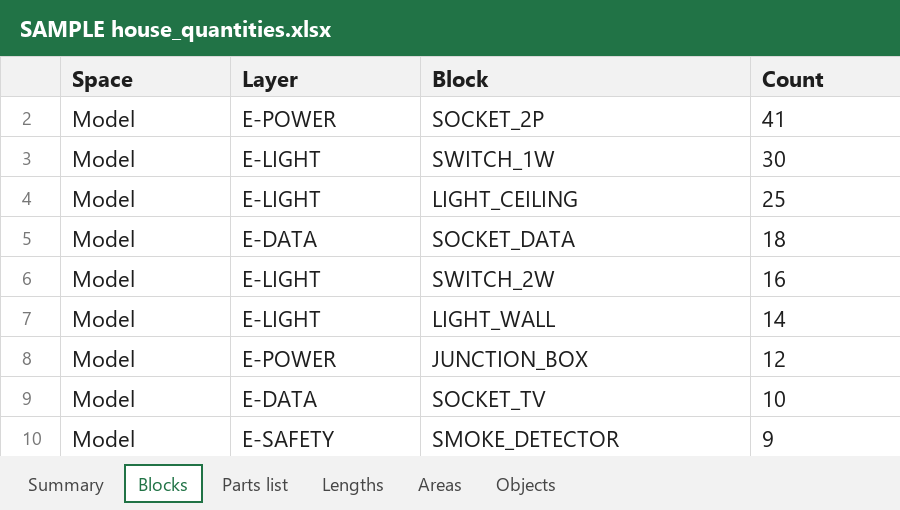
Sample Excel parts list written by Lana
  • 6 sheets: summary, symbols, parts list, lengths, areas, objects
  • Saved next to your drawing, with the date in the name
  • No AI involved, so the numbers are counted, not guessed
Open a sample Excel file

PDF Every sheet as a PDF

One PDF per sheet, named after the drawing, in a PDF folder beside it. Ready to send.

Just tell Lana: "make a PDF on A3". Tested on BricsCAD and on progeCAD.

DWG Changed copies, originals untouched

Tell Lana what to change, see every change first, then press Apply. For a whole folder she writes the results into a new "Lana copies" folder.

A check before you send

Empty title block fields, an old date, objects hidden on switched-off layers, lines drawn twice, notes left behind.

Download now

Works with

AutoCADBricsCADZWCADGstarCADINTELLICADprogeCAD
1

Download

Fill in the form and get Lana for Windows. Double-click the file and she starts.

2

Open your drawing

Keep working in your own CAD. Lana finds it and reads the drawing you have open.

3

Ask Lana

Ask anything about the drawing: counts, layers, rooms, title block. She answers in seconds.